

Table of Contents
- Define Your Brand Identity Before You Design Creator Merch
- Know Your Audience and Niche for Merch Design
- Step 1: Choose Your Merch Products and Platform
- Step 2: Design Principles for Memorable Creator Merch
- Step 3: Create Your Designs with the Right Tools
- Best Print on Demand Services for Creators: A Quick Guide
- Merch Design Ideas for Influencers to Stand Out
- Creator Merch Marketing Strategies for a Successful Launch
- Frequently Asked Questions
Designing branded creator merch that actually sells starts with a clear visual identity, not a blank t-shirt template. Branded creator merch is a physical extension of your online persona, and when done right, it turns casual followers into loyal customers who wear your brand in public. This guide from Vireous.Shop walks you through the entire process, from defining your aesthetic to launching a collection your community will actually buy.
Most creators skip straight to picking products and slapping a logo on them, which rarely works because the merch doesn't connect with your audience's identity or your content's core message. Instead, treat merch like a product line: define who you are, understand who buys from you, design with intention, and choose a fulfillment model that protects your profit margins.
Define Your Brand Identity Before You Design Creator Merch
Your brand identity is the visual and emotional foundation for every piece of branded creator merch you produce, including your color palette, typography, logo, content tone, and overall vibe. Without it, your merch will look generic and fail to stand out.
Start by documenting your mission as a creator, your visual aesthetic, and the emotion you want fans to feel when they wear your products. A gaming streamer might lean into bold neon colors and futuristic fonts, while a lifestyle vlogger might prefer muted earth tones and minimalist line art.
Your brand identity also dictates design scalability. A simple, high-contrast logo works across hoodies, hats, and canvas prints, while a complex illustration may only suit larger formats. Keep your core mark versatile so you can expand your merch catalog without redesigning everything.
Know Your Audience and Niche for Merch Design
Successful creator merch feels personal to the buyer. Audience research means understanding what your followers value: inside jokes, catchphrases, visual motifs, or causes they care about. Survey your community directly or study comments and DMs for recurring themes.
Niche research goes beyond demographics. Look at what other creators in your space sell and what their fans complain about missing. Your 5,000 loyal followers will buy designs that feel exclusive to your community, not a knockoff of someone else's drop.
Create a simple poll in your community asking which product they'd actually wear or display. This reduces guesswork and pre-validates demand before you invest in samples or inventory, while also building anticipation for the eventual launch.
Step 1: Choose Your Merch Products and Platform
Selecting the right products and platform determines your profit margins, quality control, and how much work you handle yourself. Your main options are print-on-demand services or bulk inventory, each suiting different stages of a creator's growth.
Print-on-demand eliminates inventory risk and upfront costs: you upload designs, the platform prints and ships each order, and you pay per unit. This model works best for testing new product ideas without committing to hundreds of units. Merch store integration with platforms like Shopify makes the process straightforward, though per-unit costs are higher and margins run thinner than bulk orders.
Bulk inventory requires upfront capital but dramatically improves profit margins. Order 100 to 500 units of a proven design, store them, and fulfill orders yourself or through a third-party warehouse. This approach demands inventory management skills and carries risk if a design underperforms. Many creators start with print-on-demand, validate their best sellers, then move to bulk for those items.
Your choice also affects shipping costs and customer experience. Print-on-demand ships from multiple facilities, sometimes splitting orders into separate packages, while bulk fulfillment lets you control packaging and include handwritten notes or stickers that boost customer loyalty.
Step 2: Design Principles for Memorable Creator Merch
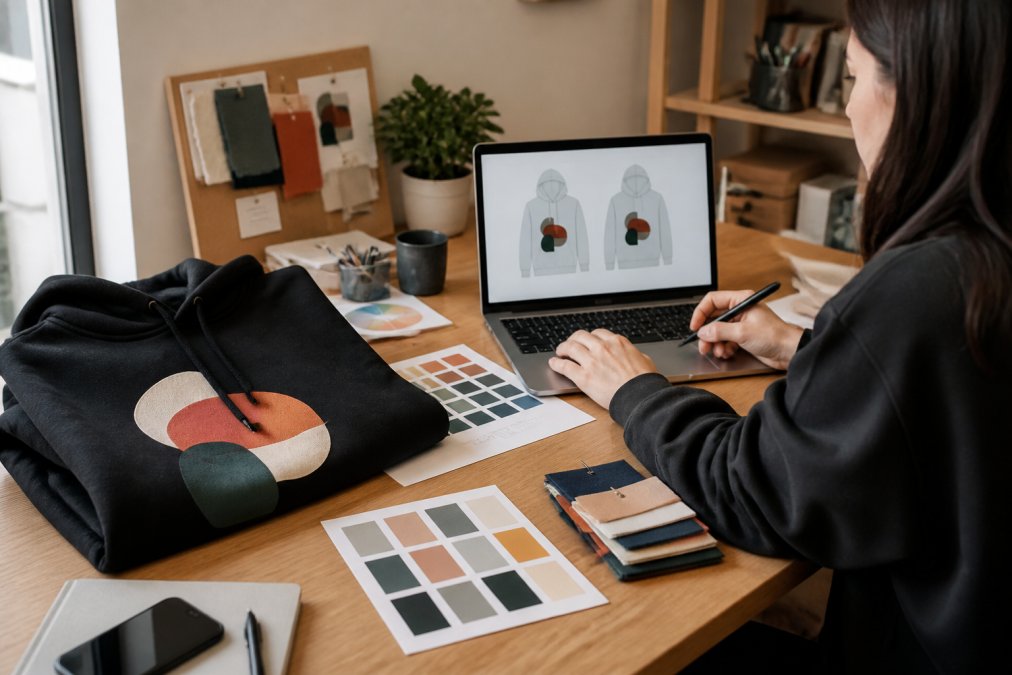
Strong merch design balances visual appeal with production practicality. The most common mistake is creating artwork that looks great on screen but fails in print. You need vector files or high-resolution raster images, typically 300 DPI at full print size, to avoid pixelation (the FDA).
Color management matters more than most creators realize. Screens display RGB color, while printers use CMYK, so bright neon colors on your monitor can come out dull and muddy on fabric. Always request physical product samples before a full launch to verify color accuracy and print quality.
Typography and layout should follow your brand aesthetic with visual consistency across all items. A design that works on a t-shirt chest might need repositioning for a hoodie back or a canvas print. Keep your core artwork scalable and test it at different sizes. Simple, bold graphics with high contrast travel best across product categories.
Platform-Specific Design Specs You Can't Afford to Ignore
Where your merch is displayed and sold dictates the technical specifications you must design for. A design that looks perfect on a YouTube thumbnail may be cropped or unreadable on a TikTok Shop listing. Here are the key specs for the major platforms where creators sell branded merch:
YouTube Shelf
- Aspect Ratio: 16:9 for the featured product image.
- Resolution: Minimum 1280 x 720 pixels, but 1920 x 1080 is recommended for crispness on large screens.
- File Size: Keep images under 2MB to ensure fast loading.
- Design Implication: Your product's focal point must sit within the center-safe area to avoid being cut off by the platform's UI overlays (like the title and view count).
TikTok Shop
- Aspect Ratio: 1:1 for the main product image, with 9:16 video content for the product detail page.
- Resolution: 800 x 800 pixels minimum for images; video should be 1080 x 1920.
- File Size: Images up to 5MB are accepted, but smaller is better for mobile data users.
- Design Implication: Since TikTok is a mobile-first platform, your design must be legible at a small size. High-contrast, bold graphics outperform fine details that blur on a phone screen.
Instagram Shopping
- Aspect Ratio: 1:1 for feed posts and 4:5 for portrait-oriented product tags.
- Resolution: 1080 x 1080 pixels (feed) and 1080 x 1350 pixels (portrait).
- Design Implication: Your merch will be viewed in a grid alongside other content. The design needs to be visually striking enough to stop the scroll, even at a thumbnail size.
The Print-Ready File Checklist
Beyond platform specs, your print files must meet the production house's standards. A common point of failure is submitting a file that is technically correct but practically flawed. Use this checklist before uploading any design:
- Vector or High-Res Raster: Use vector files (AI, EPS, PDF) for logos and text. If using raster, ensure it's 300 DPI at the actual print size.
- Color Profile: Convert all files to CMYK. If your POD service accepts RGB, ask if they auto-convert; if so, verify the result with a sample.
- Bleed and Safe Area: For edge-to-edge prints, include a 0.125-inch bleed (printingforless.com). Keep all critical elements (text, logos) at least 0.5 inches from the edge to prevent cutting.
- Transparency: Flatten all layers and remove any hidden elements to avoid file corruption or printing errors.
Step 3: Create Your Designs with the Right Tools
You don't need to be a professional illustrator to create compelling creator merch. Graphic design tools range from beginner-friendly web apps to professional desktop software, and newer AI-powered options let you generate artwork from text descriptions.
For full control, vector-based software like Adobe Illustrator or Affinity Designer gives you infinite scalability for logos and typography. These tools have a learning curve but produce the cleanest print files. Free alternatives like Inkscape or Canva's pro tier handle many designs, though you must export at sufficient resolution.
AI-powered creation tools now let you generate unique artwork from natural language prompts, ideal for creators without traditional design skills. Vireous.Shop integrates with OpenAI's DALL-E 3 API, allowing you to describe a concept and receive a custom visual ready for print.
Regardless of your tool, always export final files as PNG or vector PDF at the platform's required resolution. Keep your source files organized by product type so future edits don't require redesigning from scratch.
Best Print on Demand Services for Creators: A Quick Guide
Choosing the right print-on-demand partner affects product quality, shipping times, and your profit margins. The best services balance print quality, product catalog breadth, and integration ease with your existing storefront.
| Platform | Best For | Key Strength | Watch Out For |
|---|---|---|---|
| Vireous.Shop | AI-generated art and apparel | DALL-E 3 integration, fast dispatch | Smaller catalog than giants |
| General POD leader | Apparel variety | Huge product selection | Crowded marketplace |
| Print fulfillment | Storefront integration | Automates order routing | Per-unit costs add up |
Vireous.Shop stands out for creators who want AI-powered customization. You can generate designs from text prompts, apply them to satin canvas prints or apparel, and ship with same-day or next-day dispatch. Our Digital Content Creators Photorealism Art Print on satin canvas demonstrates how a single AI-generated design translates into a ready-to-hang product with a wooden inner frame and metallic mounts.

When evaluating any service, request samples, check print durability after washing, and confirm the platform handles copyright infringement claims properly. Your design files must be your original work or properly licensed.
Merch Design Ideas for Influencers to Stand Out
Merch design ideas for influencers should reflect your content niche while offering fans something they can't find in mass retail. The strongest concepts come from your existing content: catchphrases, recurring jokes, visual motifs, or community inside references.
For lifestyle and travel creators, minimalist typography paired with location-inspired graphics works across apparel and wall art. Gaming and tech creators often succeed with bold, graphic-heavy designs featuring mascots or iconic symbols from their streams. Educational creators might turn key lessons into clever, wearable statements that spark conversation.
Limited-edition drops with unique colorways create urgency and reward your most engaged followers. Design merch that functions as a status symbol within your community, a design that makes the wearer feel like an insider will always outperform a generic logo placement.
Sustainability and ethical sourcing also differentiate your merch. Many services now offer organic cotton or recycled materials, which resonates with younger audiences and gives you marketing content beyond the product itself.
Creator Merch Marketing Strategies for a Successful Launch
A successful merch launch depends on building anticipation before you ever open the store. Treat the drop as an event, not a passive listing. Tease designs across your content for one to two weeks before launch, showing behind-the-scenes creation and product samples.
Email marketing and community platforms like Discord or Patreon give your most loyal fans early access. Offering a discount code rewards their engagement and creates initial sales momentum. Limited quantities or a 48-hour ordering window amplify urgency, though this works best with print-on-demand since you won't hold unsold inventory.
The Pre-Launch Tease: A 14-Day Countdown
A structured pre-launch campaign builds more hype than sporadic posts. Here’s a day-by-day framework used by successful creators:
- Day 1: Announce the drop date with a single, low-res silhouette of the product. Do not reveal the design.
- Day 3: Poll your audience on a colorway choice. This makes them feel invested before they've spent a dollar.
- Day 5: Share a short video of the sample being unboxed, but keep the design out of focus.
- Day 7: Reveal the design on your most engaged platform (e.g., Instagram Reels or TikTok).
- Day 10: Post a 'fit check' of you wearing the merch in your natural environment.
- Day 12: Send a final reminder to your email list with a countdown timer.
- Day 14: Launch at a specific time (e.g., 12:00 PM EST) and go live on a stream to watch the sales tick in.
Post-Launch Community Engagement: The Untapped Growth Loop
Most guides stop at the sale. The creators who build lasting merch businesses treat the post-launch phase as the beginning of the next cycle, turning a buyer into a superfan and a superfan into a repeat customer.
User-Generated Content (UGC) Campaigns
Launch a dedicated hashtag (e.g., #MyBrandNameFit) and encourage buyers to post photos or videos of themselves wearing or using your merch. To incentivize participation, run a monthly giveaway where one random post wins a free item from your next drop. This does three things:
- Provides Social Proof: Real-world photos of your merch on real people are far more persuasive than your polished product shots.
- Creates a Content Library: You can repost this UGC to your own channels, filling your content calendar with authentic material.
- Builds a Feedback Loop: You'll see how your merch actually fits and wears, giving you data for future design tweaks.
Community Challenges and Inside Jokes
Tie your merch to a specific community challenge. If you're a fitness creator, challenge your community to do a workout in your merch and post their results. If you're a gaming creator, create a design based on a popular inside joke and ask your community to caption it. This makes the merch a symbol of belonging, not just clothing.
The 'Insider' Status
Design limited-edition items available only to your top-tier patrons or Discord members. This creates a tiered community structure where merch becomes a status symbol, rewarding your most loyal fans and creating a fear-of-missing-out (FOMO) effect for the rest of your audience.
Measuring What Matters: Post-Launch Analytics
Track more than just revenue. Use your store's analytics and platform insights to understand the health of your merch line:
- Repeat Purchase Rate: How many customers bought from your last drop and this one? A rate above 20% indicates strong community loyalty (hbr.org).
- Best-Selling Item vs. Best-Engaging Design: Sometimes the design that gets the most likes isn't the one that sells the most. Use this data to inform your next drop's product mix.
- Geographic Data: Where are your buyers located? This can inform your shipping strategy and whether you need international fulfillment options.
Frequently Asked Questions
How can I design my own branded merchandise?
Start by defining your brand identity: your visual style, tone, and core message. Then, choose a platform like Vireous.Shop that offers design tools and print-on-demand services. Create your artwork using graphic design software or AI-powered tools, upload it to the platform, and use mockups to see how it looks on apparel. Order a sample to check quality before selling to your audience.
What type of merch sells the most for creators?
T-shirts and hoodies remain top sellers because they act as wearable billboards for your brand. However, items that fit your specific niche can perform well, such as art prints for a design channel or tote bags for a lifestyle vlogger. The key is to offer products your audience will actually use and that reinforce their connection to your community.
Do I need a business license to sell creator merch?
You typically don't need a formal business license to start selling merch through a print-on-demand service. You will need to report the income on your personal tax return. However, as your sales grow, consider forming an LLC to protect your personal assets. Check your local and state regulations for any specific requirements.
How do I incorporate my personal brand into clothing designs?
Move beyond just adding your logo. Use your brand's color palette, typography, and recurring visual motifs. Create designs that reference inside jokes, catchphrases, or values your community shares. The goal is to create merch that feels like a badge of belonging, not just an advertisement. Focus on visual consistency across all your products.
This article was written using GrandRanker