

Last Updated: October 27, 2026
Quick Summary
To create consistent characters for AI art, build a reusable prompt template that describes the face, body, outfit, style, and lighting in identical wording every time. Add a reference sheet of multiple angles and expressions, then lock the seed, use image references, and keep detail locking on permanently.
- Every character prompt needs five slots: face and head, body, signature outfit, style and medium, lighting and mood.
- Build a reference sheet with front, three-quarter, and profile views plus neutral, smiling, and serious expressions.
- Pose changes are the number one consistency killer, so generate the pose first and then run image-to-image.
- Never rewrite your character description between prompts, since every swapped synonym introduces visual drift.
- Lock your character across a dozen generations before ordering a small test print of the final art.
Table of Contents
- Why Your AI Characters Keep Changing (And What Actually Fixes It)
- Build an AI Character Prompt Template You Can Reuse
- Create an AI Character Reference Sheet Before You Generate Anything
- Lock the Face: Seed, Image Reference, and Detail Locking
- Maintain AI Character Consistency Across Images, Poses, and Scenes
- The Best AI Tools for Consistent Characters
- Common Mistakes That Break Character Consistency
- Turn Your Locked Character Into Canvas Art and Brand Merch
- Frequently Asked Questions
Why Your AI Characters Keep Changing (And What Actually Fixes It)
If you've ever generated a hero image you loved, then watched the same character come back with a different nose, jaw, and eye color on the next prompt, you already know the core problem. AI image models don't remember your character. Each generation starts fresh unless you force it to do otherwise.
That's the whole game with how to create consistent characters for AI art: you stop relying on the model's memory and start building a repeatable system. Creators may want a character that can appear on canvas prints, apparel, and merch without drifting into a stranger.
The fix isn't one magic prompt. It's four habits stacked together:
- A reusable prompt template
- A reference sheet built before you generate anything
- Locked seeds and image references
- A disciplined workflow for poses and scenes
Below, we'll walk through all seven methods, including the exact template and the mistakes that quietly break consistency.
Build an AI Character Prompt Template You Can Reuse
A character prompt template is a fixed block of descriptive text you paste into every generation, changing only the scene details. It's the simplest consistency tool you have, and most people skip it.
The reason it works: you're removing variation from the parts of the image that should never change. If your character has a widow's peak, a scar over the left brow, and a specific jacket, those words appear in every single prompt, word for word.
The Five Slots Every Character Prompt Needs
Every reusable character prompt should cover five slots:
- Face and head: age, face shape, eye color, hair color and style, distinguishing marks
- Body: build, height impression, posture
- Signature outfit: the one garment or accessory that always appears
- Style and medium: photo, oil painting, comic ink, 3D render
- Lighting and mood: soft window light, harsh noon sun, moody dusk
Keep the wording identical each time. Don't paraphrase "short auburn hair" into "reddish short hair" on the next prompt. Small word swaps produce big visual drift.
A Fill-In Example You Can Copy
Here's a template you can adapt. Fill the brackets once, then reuse the whole block:
[Age] year old [gender] with a [face shape] face, [eye color] eyes, [hair color and style], and a [distinguishing mark]. [Build] frame, [posture]. Wearing [signature outfit]. [Style and medium], [lighting], [mood]. Scene: [change this only].
A common mistake is burying the character description in the middle of a long prompt. Put it first. Models tend to weight the opening words more heavily, so lead with the face.
Create an AI Character Reference Sheet Before You Generate Anything
An AI character reference sheet is a single image or document showing your character from multiple angles and expressions, used as a visual anchor for every future generation. Build it before you make anything else.
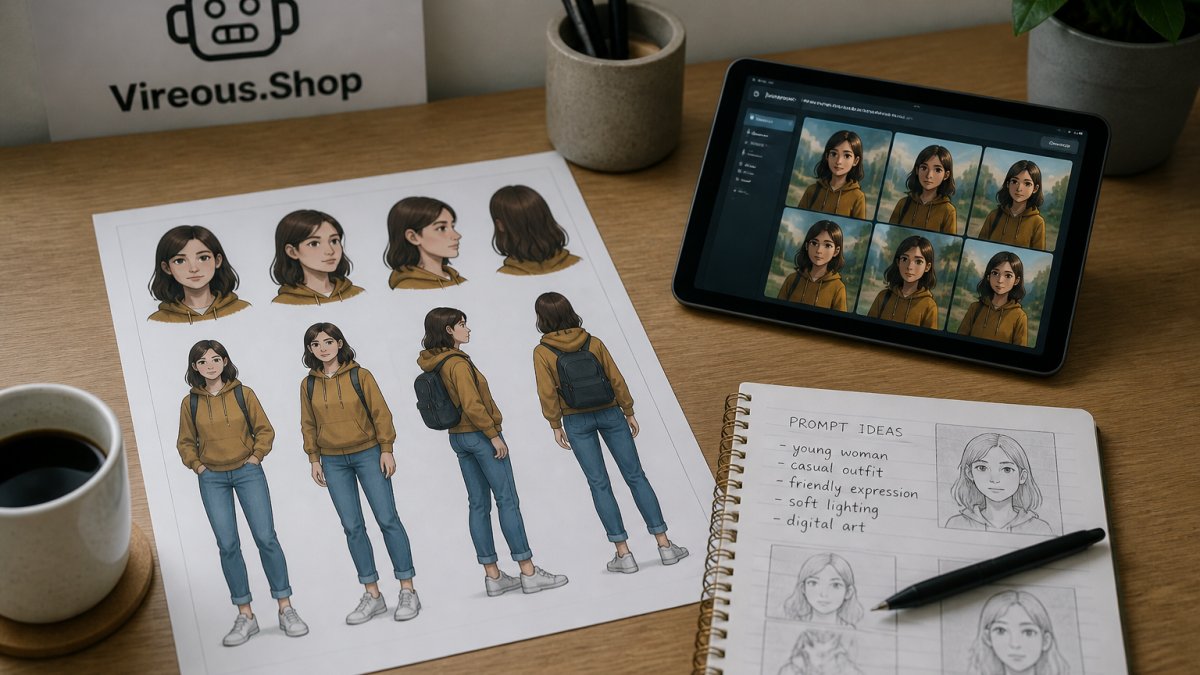
Start by generating a plain, front-facing portrait with neutral lighting. No dramatic shadows, no busy background. Once you have a face you like, generate the same character in:
- Front, three-quarter, and profile views
- Neutral, smiling, and serious expressions
- Full body in the signature outfit
Save these to one folder and label them clearly. This sheet becomes your source of truth, and it's the reference you feed into image-to-image tools later. If you want a deeper walkthrough on assembling visual references from AI tools, how to create mood boards with AI tools covers the same building blocks.
Lock the Face: Seed, Image Reference, and Detail Locking
Seed locking is the practice of reusing the same random seed number so the model starts from an identical baseline each time. Combined with an image reference, it's the closest thing to a memory that AI art tools offer.
Here's how the three locking methods differ:
| Method | What It Does | Best For | Limitation |
|---|---|---|---|
| Seed lock | Reuses the same starting noise | Same pose, minor tweaks | Breaks when pose changes |
| Image reference | Feeds your reference sheet as a guide | New scenes, same face | Can copy unwanted details |
| Detail locking | Fixes specific traits in the prompt | Long-term character identity | Needs strict wording discipline |
Use all three together. Lock the seed when you're iterating on one image. Switch to image reference when you need a new pose or setting. Keep detail locking on permanently through your prompt template.
Watch out: feeding a low-resolution reference image into an image-to-image tool will drag that blurriness into the output. Always use your sharpest reference.
A psychedelic-style transformed portrait is a good test case here. If you lock one face and then push it through a heavy color treatment, you can see immediately whether the underlying features held. You can see the result in this psychedelic AI-transformed face art print.
Maintain AI Character Consistency Across Images, Poses, and Scenes
Consistency across images means the character stays recognizable even when everything around them changes. That's harder than locking a single portrait, and it's where most workflows fall apart.
Create Your Own AI-Generated Canvas Art Print-Choose From Six Sizes-Import From →
Changing Pose Without Changing the Person
Pose changes are the number one consistency killer. The moment your character raises an arm or turns sideways, the model reinterprets the whole figure.
A practical approach:
- Generate the new pose first with a rough placeholder character
- Then run image-to-image using that pose plus your reference sheet at moderate strength
- Keep your character description block identical in the prompt
- Reject anything that shifts the face shape, even slightly
Don't accept "close enough." One drifted generation becomes the new reference, and the drift compounds.
Outfits, Props, and Backgrounds That Stay Recognizable
Treat your character's signature outfit like part of their face. If they wear a green canvas jacket in image one, that jacket appears in every prompt with the same wording.
For backgrounds, vary freely. A character can stand in a kitchen, a forest, or a studio and still read as the same person, as long as the face and outfit hold. If you plan to display these scenes as wall art, AI-generated wall art for creative home offices has ideas for arranging a matching set.
The Best AI Tools for Consistent Characters
The best AI tools for consistent characters are the ones that expose seed control, image referencing, and prompt weighting. If a tool hides all three, consistency becomes guesswork.
Look for these capabilities before you commit to a platform:
- Seed control: you can set and reuse a seed number
- Image reference or image-to-image: you can upload your reference sheet
- Prompt weighting: you can emphasize the character block over the scene
- Character or subject memory features: some tools let you save a character profile
- Batch generation: you can produce variations fast and pick the closest match
Most major image generators now offer at least seed control and image referencing. Check the documentation for your specific tool, since menus and names change often. The official OpenAI image generation documentation is a reference point for image-generation behavior, and it's worth reading before you build a workflow around any one feature.
No tool will hold your character for you. The workflow does the work. The tool just needs to stay out of the way.
Common Mistakes That Break Character Consistency
The biggest mistake is rewriting your character description between prompts. It feels harmless. It isn't. Every synonym you swap introduces a new variable the model interprets differently.
Other frequent breakers:
- Using a different style keyword mid-project. "Photorealistic" and "cinematic photo" are not the same instruction.
- Letting the scene description crowd out the character. If the background gets 80% of the words, the background wins.
- Skipping the reference sheet. Without a visual anchor, you're relying on text alone.
- Accepting a drifted image as the new reference. This is how a character slowly morphs over twenty generations.
- Changing aspect ratio between images. A square crop and a wide crop frame the face differently.
Facial detail matters most in close-up portraits, where every feature is visible. A detailed AI portrait of an older woman's face is a useful stress test, because fine lines and texture reveal drift fast. You can study the level of detail we mean in this AI portrait on stretched satin canvas.
Turn Your Locked Character Into Canvas Art and Brand Merch
Once your character holds steady across a dozen generations, you have something worth printing. A locked character becomes a repeatable brand asset: the same face on a canvas, a tote, or a tee.
You can create your own AI-generated canvas art print and import artwork from OpenAI. The print is available in six sizes and is made on fade-resistant poly-cotton canvas, hand-stretched over solid wood stretcher bars and ready to hang.

The workflow:
- Lock your character using the template and reference sheet above
- Generate the final scene at the highest resolution your tool allows
- Center the image in the print area using the on-screen guidelines
- Order a small test print before committing to a large run
A face that looks crisp on a screen can soften at large sizes.
Frequently Asked Questions
How do you keep the same character consistent in AI-generated images?
Lock three things and stop changing them: the written description of the face and body, the seed or image reference, and the wording order of your prompt. Write the character once as a fixed block of text, then paste that exact block into every new prompt before adding scene details. If your tool supports seeds or image references, reuse the same value for every generation. Changing even one descriptive word, like swapping brown eyes for hazel, is enough to produce a different person.
Can you create consistent characters from a single reference image?
Yes, and one clear image is often better than a long description. Use a front-facing, evenly lit image with no heavy shadows or filters, then attach it as an image reference in your generator and describe only what changes. Keep the reference image at the same resolution each time. If your tool offers a strength or similarity setting, raise it for close-ups and lower it slightly for full-body or action shots where the face occupies fewer pixels.
What details should you include in an AI character prompt template?
Cover five slots in a fixed order: age and build, face specifics, hair, a signature outfit, and a distinguishing mark such as a scar, freckle pattern, or glasses. Add a short style line so the rendering stays uniform. Skip vague words like beautiful or cool, which the model interprets differently every run. Concrete, countable details such as a 2-inch scar above the left eyebrow give the model something stable to reproduce.
How do you keep a character's face and clothing consistent across different poses?
Generate the face and outfit in a neutral standing pose first, then use that result as the reference for every pose change. Describe the pose as a separate sentence at the end of the prompt rather than rewriting the whole description. For clothing, name the fabric, color, and cut in the same words every time. If a pose distorts the face, regenerate at a larger crop of the head before scaling back out.
Getting a character to hold its identity across dozens of images is the hard part, and most creators give up before they build the reference sheet that makes it possible. Vireous.Shop gives you a place to put that work to use: import your locked character from OpenAI, preview it on canvas in six sizes, and order a print that ships fast, backed by our Money Back Guarantee. Get started with Vireous.Shop and turn one consistent character into a finished piece you can hang or sell.
