

Table of Contents
- Why Creators Are Looking Beyond Pixels for Custom AI Prints
- Quick Comparison: Top AI Print Alternatives at a Glance
-
Best AI Art Generator for Print on Demand: Platform Breakdown
- Vireous.Shop: Fast Turnaround with DALL-E 3 Integration
- Printify: All-in-One AI Generation and Production
- Printful: Premium Giclee Quality for Fine Art Prints
- Redbubble: Marketplace Approach for Passive Income
- Prodigi: Global Network with AI Mockup Generator
- Poster Ninja: Specialized AI Image Upscaling Service
- How to Increase DPI for AI Art Before Printing
- AI Image Upscaler for Printing: Workflow and Tools
- Converting Text Prompts to Print-Ready Art: Step-by-Step Workflow
- Free vs. Paid AI Print Alternatives: What You Actually Get
- Legal and Copyright Considerations for Commercial Prints
AI Print Alternatives to Pixels: 2026 Guide
Last Updated: August 4, 2026
Creators seeking custom AI prints increasingly use specialized print-on-demand solutions that integrate AI generation with production. The pixels alternative for custom ai prints market has expanded dramatically, offering pathways to transform text prompts into physical products without managing inventory or shipping.
Why Creators Are Looking Beyond Pixels for Custom AI Prints
Most creators hit the same wall with generic design tools: clunky workflows, manual quality control, and scaling from one print to a hundred requires rebuilding your entire process. The real problem isn't design generation, it's the gap between "I have a cool AI image" and "I have a product I can actually sell."
The pixels alternative for custom ai prints category exists because original tools were built for graphic designers, not creators. They optimize for flexibility over speed, customization over consistency. What separates the platforms we'll cover is their approach to that problem: some handle AI generation natively, others focus purely on print quality, and a few do both.
Quick Comparison: Top AI Print Alternatives at a Glance
| Platform | Best For | Key Strength | Integration |
|---|---|---|---|
| Vireous.Shop | Fast turnaround with AI customization | Same/next-day dispatch + DALL-E 3 | OpenAI native |
| Printify | All-in-one dropshipping | Free tier + AI image generator included | 15 free generations daily |
| Printful | Fine art reproduction | Giclée printing quality | Shopify, Etsy, custom APIs |
| Redbubble | Passive income marketplace | Existing customer base of millions | Upload and earn commission |
| Prodigi | Global reach with mockups | AI mockup generator + fine art labs | 500K+ products, API available |
| Poster Ninja | Specialized AI upscaling | 6X upscaling for low-res images | Gicclée printing only |
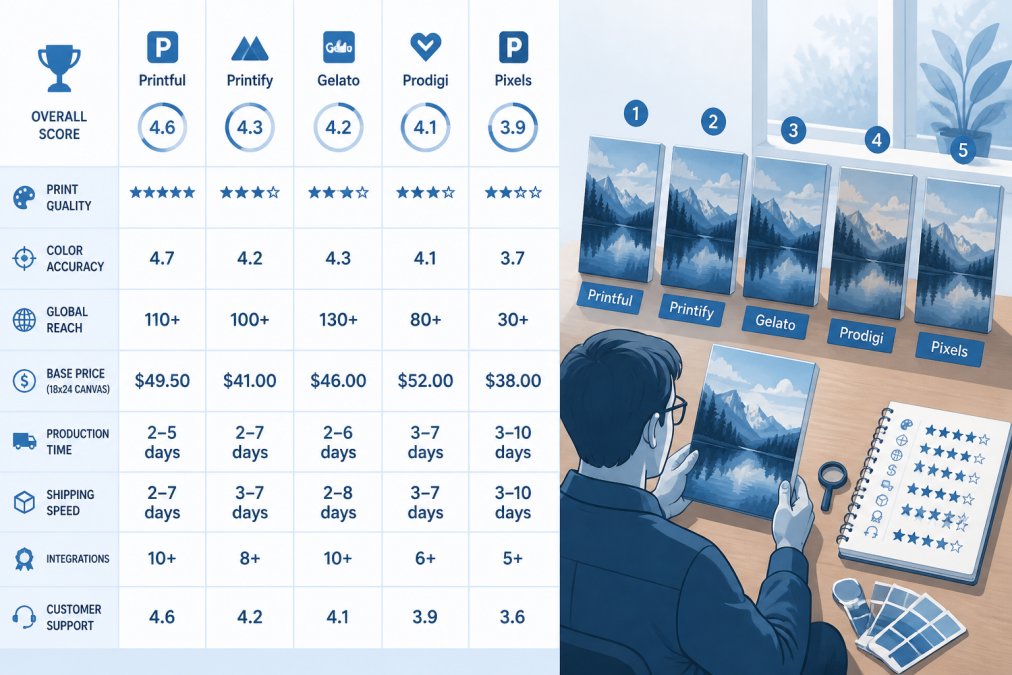
The landscape breaks into two categories: platforms that generate AI art and print it (Vireous.Shop, Printify, Printful), and those specializing in one or the other (Redbubble for marketplace distribution, Poster Ninja for upscaling).
Best AI Art Generator for Print on Demand: Platform Breakdown
Vireous.Shop: Fast Turnaround with DALL-E 3 Integration
Vireous.Shop solves the speed problem that kills most creator workflows. Same-day or next-day dispatch means you can generate a design at 9 AM and have a physical product by tomorrow, a competitive advantage when testing designs or fulfilling custom orders.
The platform integrates OpenAI's DALL-E 3 API directly, letting you describe what you want in natural language. Prints are fast and genuinely good, with canvas art backed by a Money Back Guarantee. Private label options let you white-label designs for your brand.
Printify: All-in-One AI Generation and Production
Printify includes a built-in AI image generator powered by OpenAI, offering 15 free daily generations on the free tier. Premium subscription unlocks unlimited generations and print discounts, significantly improving unit economics for volume creators.
The product catalog is enormous: apparel, home decor, accessories, drinkware. Integration with Shopify, Etsy, and other platforms is seamless. For unique AI aesthetics, generate images elsewhere (Midjourney, Stable Diffusion) and upload to Printify for production.
Printful: Premium Giclee Quality for Fine Art Prints
Printful specializes in gicclée printing, the same technology used for museum reproductions. If your AI art sells at $200+ per print, Printful's quality justifies the premium.
The company doesn't include an AI generator, you bring your own images. Integration with Shopify and Etsy is native. The trade-off is cost: gicclée prints require higher pricing or lower margins, but for artists selling limited-edition prints, it's the right choice.
Redbubble: Marketplace Approach for Passive Income
Redbubble inverts the traditional model. Upload designs to their platform and they handle production, shipping, and customer service. You set a markup on the base product cost; Redbubble takes their cut.
The advantage is reach, millions of existing shoppers browse for art and apparel. The disadvantage is control: you can't customize the customer experience, have no direct buyer relationships, and Redbubble requires clear disclosure that designs are AI-generated.
Prodigi: Global Network with AI Mockup Generator
Prodigi offers 500,000+ customizable products and operates a global network of print labs for localized production. The standout feature is the AI mockup generator, which creates realistic mockups of your designs in specific environments, your art print hanging in a modern living room, your apparel on an actual person.
Pricing is transparent. The free tier lets you order test prints at cost. Prodigi Pro subscription is available on both monthly and annual plans, with annual billing offering the equivalent of two months free.
Poster Ninja: Specialized AI Image Upscaling Service
Poster Ninja solves a specific problem: enlarging low-resolution AI art by 6X while retaining sharpness and detail. The platform uses AI-based upscaling to reconstruct detail, not interpolation.
The platform offers gicclée printing on heavyweight photo papers with 200+ year archival ratings. It does upscaling and printing only, no design generation or storefront integration.
How to Increase DPI for AI Art Before Printing
Understanding DPI (dots per inch) is essential when moving from screen to print. Most creators generate beautiful images on screen and get back blurry, pixelated results.
Understanding DPI vs. PPI for Physical Merchandise
DPI is the resolution of a printed image, how many dots of ink the printer places per inch. For professional printing, you need at least 300 DPI. A 4x6 inch print requires an image at least 1200x1800 pixels. A 24x36 poster needs 7200x10800 pixels.
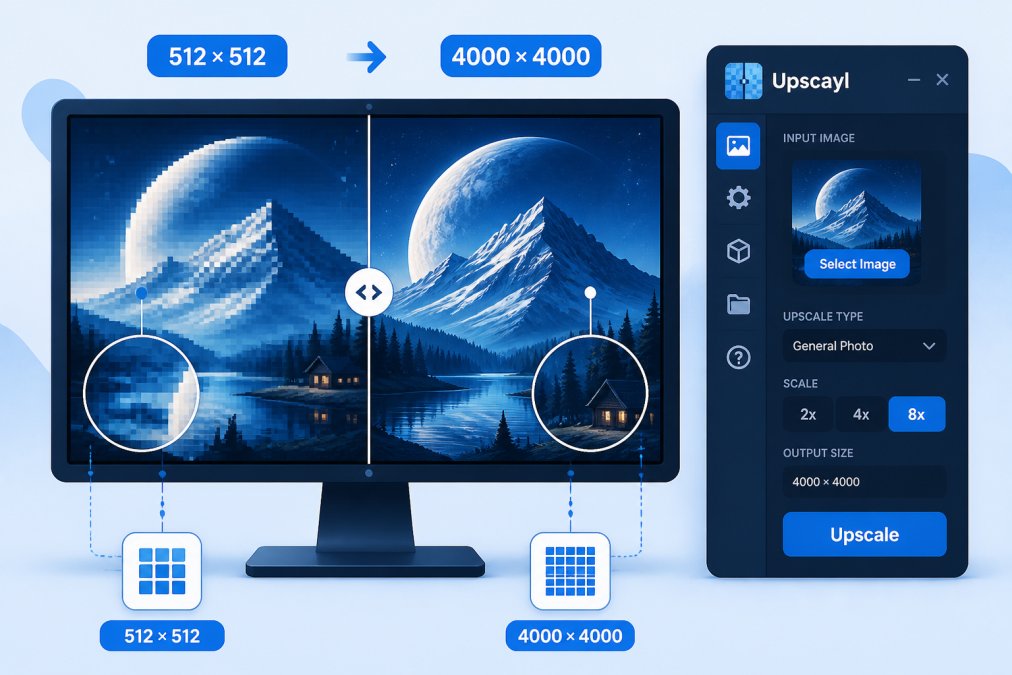
Most AI image generators default to 512x512 pixels, completely unusable for anything larger than a postage stamp. This is why upscaling exists: you're reconstructing detail that compression removed.
Upscaling Techniques: Machine Learning vs. Interpolation
Interpolation is the old way. The software guesses what should go between existing pixels. Results are blurry and soft.
Machine learning upscaling is modern. Tools like Upscayl (open-source), Real-ESRGAN, and Topaz Gigapixel use trained models to understand what detail should exist at different scales. For AI art, upscaling works better than for photographs because the model understands artistic intent.
Export Settings That Prevent Pixelation and Artifacts
For print, always export as TIFF or high-quality PNG. JPEG introduces compression artifacts visible at print size.
Color space matters. Most AI generators output in RGB (red, green, blue), correct for screens. Print uses CMYK (cyan, magenta, yellow, black). Convert RGB to CMYK yourself before uploading. You'll see the color shift on screen, but the printed result will match your intention.
Export at 300 DPI minimum, the standard for professional printing. Don't compress the file. The file size reflects actual detail, not stretched pixels.
AI Image Upscaler for Printing: Workflow and Tools
When and Why to Upscale Before Submitting to Print
Upscale immediately after generation, before any other editing. This is the most important rule. If you edit a low-resolution image and then upscale, you're upscaling your edits along with their artifacts.
The workflow is: generate → upscale → review → edit (if needed) → color convert → export → upload to print provider.
Preparing Files for Commercial Printing: Resolution and Color Profile Conversion
Commercial print providers have specific technical requirements. Most require minimum 300 DPI at final print size and embedded color profiles, usually sRGB for web-based previews or CMYK for actual printing.
Before uploading, embed the color profile in your file. In Photoshop: Image → Mode → CMYK (or sRGB, depending on provider requirements). Check the print provider's file specifications, some accept PNG, others require TIFF.
Create a test file at a smaller size first. Order a 4x6 or 5x7 print to verify color, sharpness, and overall quality before committing to large format. Most platforms charge $5-$15 for test prints, the cheapest quality control available.
Converting Text Prompts to Print-Ready Art: Step-by-Step Workflow
Crafting Prompts for High-Resolution Output
The prompt is the foundation. A vague prompt produces vague results; a specific prompt produces specific results. For AI art destined for print, you need prompts generating images with strong composition, clear focal points, and detail that survives upscaling.
Effective prompts include: subject, style, mood, composition, and technical detail. Example: "A minimalist abstract painting in cool blues and teals, geometric shapes arranged asymmetrically, high detail, professional quality, suitable for large-format printing" is infinitely better than "abstract art."
For print, avoid prompts generating very fine detail or photorealistic textures. Watercolor, oil painting, and digital art styles upscale better than photorealism.
Character Portraits and Sprites: Specialized Considerations
For portraits, be specific about lighting and expression. "A portrait of a woman, warm golden hour lighting, soft focus background, professional headshot quality" produces better results than "woman portrait."
For pixel art or retro-style sprites, prompt the style explicitly: "pixel art character, 16-bit video game style, bright colors, clear silhouette, suitable for printing on apparel."
Character consistency is the real challenge. Generate the front-facing pose first, get proportions right, then generate side views and back views with consistent proportions.
Free vs. Paid AI Print Alternatives: What You Actually Get
Free tiers exist on several platforms: Printify offers 15 daily generations, Redbubble charges no upfront fees (you only pay when someone buys), Prodigi lets you order test prints at cost.
Printify's free tier is most generous for volume creators. Premium subscription ($39/month or $299/year) cuts print costs significantly, which matters for volume orders.
Redbubble's commission model means you're paying in margin, not upfront fees. If selling a $25 print and Redbubble takes a platform fee (which varies by artist tier and markup), you're paying a portion of your earnings per sale. For testing, it's risk-free.
The real cost is per-unit cost at volume. A platform with a $50/month subscription charging $3 per print is cheaper than a free platform charging $8 per print if you're ordering 100+ units monthly.
Legal and Copyright Considerations for Commercial Prints
AI-generated images exist in a legal gray zone. In the United States, the U.S. Copyright Office has stated that purely AI-generated content may not be copyrightable, but images created with significant human direction and editing likely are.
For commercial purposes, disclose that artwork is AI-generated. Redbubble requires this. Most buyers don't care if the art looks good.
Avoid prompting "in the style of [famous artist]." Instead, describe the style without naming the artist: "Oil painting style with thick brushstrokes and warm earth tones."
Check the terms of service of your generation tool and print platform. Some restrict commercial use without explicit permission. Vireous.Shop's integration with OpenAI means you have explicit commercial rights to images generated through the platform.
If selling to a brand or building merchandise for a client, get written confirmation that you have rights to the image and that the client owns the final product.
The pixels alternative for custom ai prints landscape is fragmented by design. No single platform does everything equally well. Vireous.Shop excels at speed and integration with same-day printing and native DALL-E 3 support. Printful dominates fine art quality with gicclée technology. Printify offers the broadest product catalog and generous free tier. Poster Ninja specializes in upscaling. Redbubble provides marketplace reach.
Your choice depends on what matters most: speed, quality, reach, or cost efficiency. Most successful creators use multiple platforms, Vireous.Shop for fast tests and branded merchandise, Printful for premium art prints, Redbubble for passive marketplace sales.
Start with Vireous.Shop if you need speed and integration. Generate your first custom print in minutes using natural language prompts, with next-day dispatch and a Money Back Guarantee backing every order.
Frequently Asked Questions
What resolution do I need for custom AI prints to avoid pixelation?
For print quality, aim for at least 300 DPI at your intended print size. A 12x18 inch poster needs roughly 3600x5400 pixels. Many AI generators produce 1024x1024 or 2048x2048 images, which require upscaling before printing. Machine learning upscalers can increase resolution 2-4x while maintaining sharpness. Always check your print provider's resolution requirements, as some accept lower DPI for certain materials like canvas.
How does an AI image upscaler for printing differ from standard resizing?
Standard resizing (interpolation) stretches existing pixels, creating blur and artifacts. AI upscalers use machine learning to predict new pixels based on surrounding data, adding detail rather than just enlarging. Upscalers trained on high-resolution images generate sharper, clearer results. For AI art prints, upscaling 6x is possible without visible quality loss. This is why specialized services like Poster Ninja focus on AI-specific upscaling rather than generic resizing.
Can I use the same AI-generated image for both digital and print products?
Not without conversion. Digital images use RGB color profiles; print requires CMYK. RGB has a wider color gamut, so when converted to CMYK, some colors shift or appear duller. Before submitting to a print provider, convert your file to CMYK and preview the result. Additionally, ensure resolution meets print DPI standards (300+ DPI). Most print-on-demand platforms handle conversion, but professional prints benefit from manual color profile adjustment to match your vision.
What's the fastest way to go from text prompt to printed custom AI art?
Platforms with integrated AI generation and printing offer the fastest workflow. Vireous.Shop generates from DALL-E 3 prompts and ships same-day or next-day. Printify offers 15 free AI generations daily and connects directly to production. For maximum speed, write detailed prompts upfront, review the preview carefully, and submit high-resolution versions. Avoid multiple revision cycles; most platforms charge per iteration. Expect 3-7 days total from prompt to delivery depending on print method and shipping.
Are there free alternatives for creating print-ready AI art, or do I need paid tools?
Free AI generators (DALL-E free tier, Midjourney trials) create images but require separate upscaling and print submission. Printify and Prodigi offer free accounts with limited daily generations. However, free tiers often lack advanced features like vectorization or color profile control. Paid alternatives provide better upscaling, faster rendering, and priority support. For commercial prints, investing in a paid platform typically saves time and ensures better quality than stitching together free tools.
This article was written using GrandRanker