

Table of Contents
- Why Your Apparel Brand Needs an AI Art Generator
- Top 5 AI Art Generators for Apparel Compared
- Tips for Better AI Art Prompts for Apparel
- AI Image Upscaling for Apparel: Getting Print-Ready
- Copyright Laws for AI Generated Apparel Designs
- How to Print Your AI Designs with Vireous.Shop
- Conclusion
- Frequently Asked Questions
Last Updated: September 7, 2026
The apparel design landscape has shifted dramatically. What once required a professional photographer, a model, and a full studio setup can now be accomplished through a text prompt. The challenge most creators face isn't a lack of options, but rather choosing the right AI art generator for apparel that balances creative control with commercial safety.
Most guides treat this as a simple ranking exercise. The real question is more practical: which tool fits your specific apparel workflow, whether you are producing a single custom hoodie or launching a full merchandise line? The best choice depends on your technical comfort, your need for print-ready files, and your tolerance for legal gray areas.
Below, we'll compare the top five options, break down prompt strategies, and explain how to get your designs from screen to physical product. We'll also cover the copyright questions that most creators ignore until it's too late.
Why Your Apparel Brand Needs an AI Art Generator
An AI art generator is software that creates images from natural language descriptions, and for apparel, it replaces the entire concept-to-mockup phase of product development. Instead of commissioning expensive illustrations or searching stock libraries for generic graphics, you can generate unlimited unique concepts in minutes. This speed transforms how you test designs before committing to production.
The practical benefits extend beyond speed. For creators building a personal brand, AI tools enable style consistency across a full product line. You can iterate on a single theme, adjusting colors and compositions until the design matches your aesthetic. Many e-commerce sellers use these tools for batch processing, generating dozens of design variations in one session to identify the strongest candidates for their storefront.
The technology also lowers the barrier to entry. You do not need formal graphic design training to produce compelling visuals. What you need is the ability to describe what you want clearly, a skill that improves with practice. OpenAI's DALL-E 3 documentation provides guidance on crafting effective prompts, which is the core skill for this medium.
Top 5 AI Art Generators for Apparel Compared
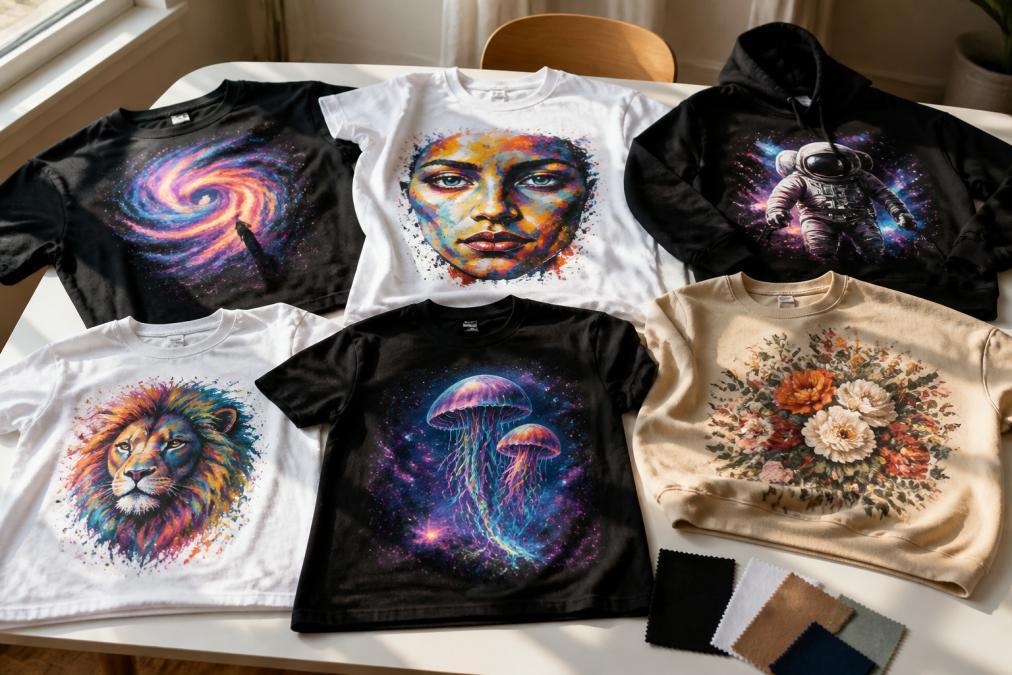
The market has consolidated around five main options, each with a distinct philosophy. Choosing among them requires understanding how their output handles the specific demands of apparel printing, including resolution, edge detail, and the ability to create seamless patterns.
| Tool | Best For | Learning Curve | Commercial Use | Print-Ready Output |
|---|---|---|---|---|
| DALL-E 3 via OpenAI | Text accuracy and prompt adherence | Low | Permitted with conditions | Good, needs upscaling |
| Midjourney | Artistic style and aesthetics | Medium | Paid tier required | Excellent with upscale tools |
| Stable Diffusion | Full control and customization | High | Depends on model license | Best with custom workflows |
| Canva AI | Quick social and web mockups | Minimal | Included in subscription | Limited, low resolution |
| Adobe Firefly | Safe commercial licensing | Low | Fully cleared | Good, integrates with Photoshop |
DALL-E 3 via OpenAI: The Creative Powerhouse
DALL-E 3 excels at understanding complex prompts, making it the most reliable option when you have a specific vision. Its integration with ChatGPT allows for conversational refinement, where you can adjust your design by describing changes rather than starting from scratch. For apparel, this means you can specify garment type, placement, and style in a single prompt.
The output quality is strong for conceptual work and textile pattern generation. Its primary limitation is native resolution, which often falls short of what print-on-demand services require for large-format garments. You will typically need an upscaling step to reach print-ready standards. However, for generating the initial creative concept, its prompt adherence is unmatched.
Midjourney: The Artistic Choice
If your apparel line leans toward artistic expression, Midjourney produces some of the most visually striking results. Its aesthetic bias toward "beautiful" output means your designs often look like curated art rather than obvious AI generations. The platform excels at mood board creation and exploring stylistic directions early in your design process.
The tradeoff is control. Midjourney operates through a Discord interface and gives you less precise command over specific elements. You guide the output through style references and iterative variations rather than direct instruction. For commercial use, a paid subscription is required, and you should review their licensing terms carefully before selling products featuring the generated art.
Stable Diffusion: The Open-Source Option
For technical users, Stable Diffusion offers the most control through local installation and model fine-tuning. You can train custom models on your existing product photos or a specific aesthetic, enabling true style consistency across an entire collection. Its image-to-image capabilities allow you to transform flat-lay photography into modeled shots, a technique many sellers use for product visualization without hiring a photographer.
This power comes with significant technical skill requirements. Running it effectively demands a capable GPU, an understanding of model checkpoints, and patience with prompt engineering. The open-source ecosystem also means licensing varies by model, so you must verify the commercial license for each checkpoint you use.
Canva AI: The Beginner-Friendly Tool
For creators who need quick mockups for social media validation, Canva's AI tools are the most accessible. You can generate a design concept and immediately place it on an apparel mockup within the same interface. This speed is valuable for testing audience reaction before you commit to production costs.
The limitation is output resolution and creative depth. Canva's AI produces competent but generic results that rarely stand out in a crowded market. It works best as a pre-production tool for concept validation rather than a source for final print-ready files. If your designs gain traction, you will need to recreate them in a more powerful tool.
Adobe Firefly: The Commercial Safe Bet
Adobe Firefly addresses the biggest concern for serious sellers: copyright clarity. Because Firefly is trained on Adobe Stock and openly licensed content, designs generated through it are safer for commercial use. This matters when you plan to scale a brand and want to avoid future legal complications.
Firefly integrates directly with Photoshop, allowing you to refine generated designs with professional editing tools. The output quality is solid, though it may lack the distinctive artistic flair of Midjourney. For creators building a long-term business, the legal safety and professional workflow integration make it a compelling choice. Adobe's approach to AI ethics and content authenticity outlines their training data standards.
Tips for Better AI Art Prompts for Apparel
A common mistake is describing the subject without the context that matters for apparel. "A dragon" produces a generic image. "A minimalist geometric dragon in monochrome, suitable for a small chest print on a t-shirt, with clean lines and high contrast" produces something you can actually use.
Structure your prompts around four elements: subject, style, composition, and technical requirements. Specify whether you want a repeating pattern, a central graphic, or a border design. Mention the print method if you know it, since screen printing favors bold colors while DTG printing can handle gradients.
For style consistency across a collection, maintain a reference phrase in every prompt. If your brand uses a specific color palette, state it explicitly. If you want a particular illustration style, name it or reference an artistic movement. This repetition anchors the AI's output to your brand identity. Google's guide to writing effective image generation prompts offers additional structural frameworks.
AI Image Upscaling for Apparel: Getting Print-Ready
Raw AI output rarely meets the resolution requirements for high-quality apparel printing. A typical generated image may be 1024x1024 pixels, which looks fine on screen but appears soft and pixelated when printed across a chest or back panel. You need an upscaling step to reach the 300 DPI standard that print providers expect.
Professional upscaling tools use AI to add detail rather than simply stretching the image. This produces sharper edges and more defined textures at larger sizes. The process is straightforward: generate your design, upscale it by 4x or more, then inspect the result at 100% zoom for artifacts.
| Print Area | Minimum Resolution | Recommended Upscale |
|---|---|---|
| Small chest logo (4x4 in) | 1200x1200 px | 2x upscale |
| Medium back print (8x10 in) | 2400x3000 px | 4x upscale |
| Full front design (12x12 in) | 3600x3600 px | 4x upscale or higher |
When upscaling, watch for issues in high-detail areas like hair, fabric textures, and fine text. These elements often reveal artifacts first. If your design includes small text, verify it remains crisp after upscaling, as blurred text is an immediate tell of AI-generated work.
Copyright Laws for AI Generated Apparel Designs
The legal landscape for AI-generated art remains unsettled, and the rules differ based on where you sell and how the tool was trained. The U.S. Copyright Office's guidance on AI-generated content states that works created entirely by AI without human authorship are not eligible for copyright protection. This means your AI-generated design may be copied by others, and you may have limited recourse.
The key distinction is human involvement. If you substantially modify the AI output, combine it with other elements, or exercise significant creative control over the final design, you may qualify for protection of those human-authored elements. The more transformative your input, the stronger your claim.
How to Print Your AI Designs with Vireous.Shop
Once your design is generated and upscaled, the printing process should be seamless. Vireous.Shop integrates directly with OpenAI's technology, allowing you to create custom designs using natural language prompts and see them on your chosen product. Our platform handles the transition from digital concept to physical product.
You can import artwork generated through DALL-E or other tools directly into our customization interface. For wall art, our Create Your Own AI-Generated Canvas Art Print starts at $37.50 and offers six size options with fade-resistant, hand-stretched canvas. For creators needing faster turnaround, we offer same-day or next-day dispatch on personalized items, so your designs reach you without production delays.

The customization process is designed for accessibility. You can upload your image, apply filters, add text, or adjust placement using our online tools. Every order is backed by our Money Back Guarantee, ensuring you are not stuck with a product that does not meet your expectations.
Conclusion
Choosing the right AI art generator for apparel comes down to your production goals. For most creators, DALL-E 3 offers the best balance of prompt accuracy and ease of use, while Midjourney suits those prioritizing artistic quality. Technical users will find Stable Diffusion's control unmatched, and Adobe Firefly provides the safest path for commercial scaling.
The workflow matters as much as the tool. Generate broadly, refine selectively, and always upscale to print-ready resolution before committing to production. Stay informed about copyright developments, as this space evolves quickly.
Ready to turn your AI-generated design into a physical product? Get started with Vireous.Shop and customize your first piece today.
Frequently Asked Questions
What is the best AI tool for apparel design?
DALL-E 3 is widely considered the best AI art generator for apparel due to its natural language understanding and high-quality output. It excels at interpreting complex prompts, which is critical for creating unique textile patterns and graphics. Midjourney is a strong alternative for artistic styles. For commercial use, verify the tool's licensing terms, as some restrict the sale of generated designs.
How do I convert AI art into high-resolution files for apparel?
AI image upscaling for apparel is essential because many generators output files around 1024x1024 pixels, which is too small for quality printing. Use a dedicated upscaler like Topaz Gigapixel or an AI tool with built-in upscaling to increase resolution to 300 DPI at your required print size. This ensures your design prints crisp and clean without pixelation.
Can AI-generated art be used for commercial apparel printing?
Yes, but you must check the copyright laws for AI generated apparel designs. If you use a tool like DALL-E 3 or Midjourney on a paid plan, you own the rights to the images you create and can use them commercially. However, you cannot copyright AI-generated images themselves, meaning others can also use similar outputs. Always review your chosen tool's terms of service.
What are the best tips for better AI art prompts for apparel?
Focus on specificity. Instead of 'cool shirt design', describe the style, subject, and composition, e.g., 'minimalist line art of a mountain range, geometric, black and white, for a t-shirt'. Specify the medium and texture like 'screen print' or 'embroidery'. Use negative prompts to exclude unwanted elements. Refine your prompts through iteration for the best results.
Which AI is best for styling clothes?
For designing apparel itself, DALL-E 3 and Midjourney are top choices. For seeing clothes on a model, look into virtual try-on technology. Tools like Zakeke, which Vireous.Shop uses, help you visualize the final product and reduce the risk of a print looking different than expected.