

Table of Contents
- How to Create Unique Canvas Prints With AI: The Complete Process
- Mastering Prompt Engineering for Canvas-Ready Art
- Best AI Image Generator for Printing High-Resolution Artwork
- How to Upscale AI Art for Canvas Without Quality Loss
- Copyright Laws for AI Generated Art and Printing
- From Personal Photos to Painted Canvas Prints
- Customizing Canvas Sizes, Materials, and Finishing Options
- Integrating AI Canvas Art Into Your Interior Design
Last Updated: August 8, 2026
How to Create Unique Canvas Prints With AI: The Complete Process
Creating unique canvas prints with AI has transformed from a niche experiment into an accessible creative tool for anyone with an idea and a vision. The process combines three core elements: generating high-resolution artwork through text-to-image models, upscaling for print quality, and selecting the right printing partner to bring your digital creation to life as a physical masterpiece.
At Vireous.Shop, we've helped thousands of creators, vloggers, and homeowners transform their imagination into tangible wall art. This guide walks you through the complete process from initial concept to the moment your personalized artwork arrives at your door, covering everything from prompt engineering to material selection.
What You'll Need Before Starting
Before generating your first image, gather these essentials: a capable computer with a modern browser, access to an AI image generator, and realistic expectations about the iterative nature of AI art generation. Budget varies based on print size and material choice, most platforms charge per image generation, then add printing costs based on dimensions and finishing options. Have reference images or mood boards ready; these visual references dramatically improve your prompt engineering results.
Mastering Prompt Engineering for Canvas-Ready Art
Prompt engineering is where most people fail to create unique canvas prints with AI that actually match their vision. A vague prompt produces vague results. A specific, layered prompt produces artwork worth printing.
Writing Effective Text-to-Image Prompts
A strong prompt for print-ready art includes four layers: the subject, the artistic style, the technical specifications, and the mood. Start with a clear subject, instead of "a landscape," specify "a misty mountain valley with pine trees and a cabin in the foreground at golden hour." Next, specify your artistic style: "impressionist oil painting," "hyperrealistic photograph," or "vintage travel poster aesthetic." Add technical direction: mention "high resolution," "masterpiece quality," or "detailed." Finally, layer in mood: words like "dramatic," "serene," or "cinematic" shape the emotional impact.
Choosing the Right Art Style for Your Wall Decor
Your art style choice determines whether the finished canvas complements your interior design. Modern minimalist spaces benefit from clean geometric abstraction; traditional interiors work better with painterly styles like impressionism. Consider your room's existing color scheme and mention spatial context in your prompt, "office wall art" produces different compositions than "bedroom wall art." Semi-realistic styles, where the subject is recognizable but rendered with painterly techniques, offer the best balance for home decor.
Best AI Image Generator for Printing High-Resolution Artwork
Not all image generators produce artwork suitable for large-format printing. Resolution, color accuracy, and artistic consistency vary dramatically across platforms.
Why DALL-E 3 Works Best for Print-on-Demand Canvas
DALL-E 3 consistently produces the highest-quality output for print-on-demand applications. It generates images at resolutions suitable for large canvas prints, interprets complex prompts with remarkable accuracy, and maintains color fidelity across iterations. The model excels at understanding nuanced artistic direction, request "a portrait in the style of a Renaissance oil painting with dramatic chiaroscuro lighting," and DALL-E 3 delivers exactly that. Vireous.Shop integrates DALL-E 3 directly into its platform, meaning you can generate, preview, and order your canvas print without switching between tools.
Comparing Generative Models for Visual Fidelity
Other capable models exist, each with strengths. Midjourney produces stunning artistic interpretations but sometimes sacrifices literal accuracy for aesthetic impact. Stable Diffusion offers flexibility but requires more technical knowledge and produces lower average quality for print applications. The critical factor: whichever generator you choose must support high-resolution output. Canvas prints at 24x36 inches or larger demand minimum 2400x3600 pixel dimensions.
How to Upscale AI Art for Canvas Without Quality Loss
AI-generated images often come out at standard screen resolution (typically 1024x1024 pixels). Printing that directly onto a large canvas produces pixelated, blurry results. Upscaling separates amateur prints from gallery-quality canvases.
Understanding DPI and Resolution Requirements
Professional printing requires minimum 300 DPI (dots per inch) for sharp, detailed output. Calculate your required resolution by multiplying your desired print dimensions by 300. A 24x36 inch canvas requires 7200x10800 pixels at 300 DPI. Most AI generators produce 1024x1024 or 2048x2048 pixel images, far below these requirements.
Upscaling Techniques for Large Prints
AI-powered upscalers, trained on millions of image pairs, reconstruct detail intelligently and maintain visual quality even at 4x or 8x enlargement. Topaz Gigapixel AI and Let's Enhance are industry-standard tools. Many print-on-demand services, including Vireous.Shop, apply intelligent upscaling automatically to ensure your canvas arrives print-ready. Most creators upscale to 4000-5000 pixels on the longest edge, which produces excellent quality for prints up to 40 inches.
Copyright Laws for AI Generated Art and Printing
Commercial Usage Rights and Licensing
Current U.S. copyright law treats AI-generated artwork differently depending on whether humans made creative decisions in the process. The U.S. Copyright Office has stated that purely machine-generated output without human creative direction cannot be copyrighted. However, artwork created through human prompting, iterative refinement, and curation involves sufficient human creativity to qualify for copyright protection.
When you write a detailed prompt, select the best output from multiple generations, and refine it through iteration, you've made creative choices that establish your ownership claim. According to guidance from the U.S. Copyright Office, works created with AI assistance where humans make creative decisions are copyrightable.
What You Can and Cannot Sell
You can sell AI-generated artwork as canvas prints, apparel, or merchandise if you created it through intentional prompting and selection. You cannot sell artwork that directly copies another person's existing work. Be transparent about AI usage if required by law or platform policy. Vireous.Shop handles this disclosure automatically.
From Personal Photos to Painted Canvas Prints
One of the most powerful applications of AI is transforming personal photographs into painted canvas art. Start with a high-quality, well-lit photograph with a clear subject. Upload your photo to an AI tool that supports image-to-image generation and describe the artistic style you want: "oil painting," "watercolor," or "impressionist." The model analyzes your photo and renders it in that style while preserving the recognizable subject. This approach works exceptionally well for pet portraits, family photos, and travel memories.
Customizing Canvas Sizes, Materials, and Finishing Options
Once your artwork is finalized and upscaled, you face decisions about physical specifications that dramatically impact the final visual impact and durability.
Gallery Wrap vs. Stretched Canvas vs. Framed Prints
Gallery wrap canvas wraps your artwork around wooden stretcher bars, creating a finished piece that hangs directly on walls without requiring a frame. This modern look works well for contemporary spaces. Stretched canvas is similar but typically features thinner bars. Framed prints add sophistication and protection, suiting formal spaces or artwork you want to preserve long-term. Choose based on your interior design aesthetic and wall space.
Selecting Color Profiles for Accurate Print Reproduction
Color profiles ensure your screen's display matches the printed output. Most professional print-on-demand services, including Vireous.Shop, automatically apply industry-standard color profiles (typically sRGB or Adobe RGB) to ensure consistency. Request a proof or sample if the service offers it, this small investment prevents disappointment on a large print.
Integrating AI Canvas Art Into Your Interior Design
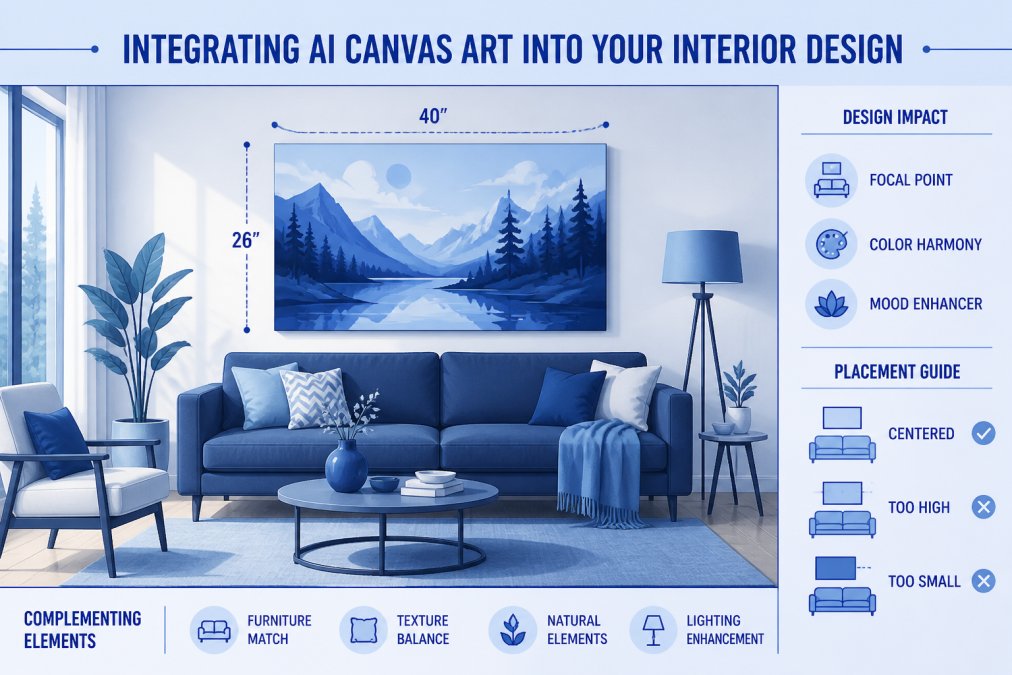
Your finished canvas print is only truly successful when it integrates seamlessly into your actual living space. Start by considering your room's dominant color palette. Your AI artwork should complement, not contrast sharply with, existing colors. Scale matters significantly, a small 8x10 canvas disappears on a large living room wall. The general rule: your artwork should occupy 50-75% of the wall space it hangs on.
Composition affects spatial perception. Landscape-oriented artwork makes rooms feel broader. Portrait-oriented pieces draw the eye upward and make ceilings feel higher. Consider the room's lighting, artwork in naturally lit spaces can handle darker tones; rooms with limited natural light benefit from lighter, brighter artwork. Most importantly, choose artwork that resonates with you personally.
Creating unique canvas prints with AI transforms a technical process into a creative journey. The tools exist, the quality is achievable, and the cost is reasonable. What separates successful creators from frustrated ones is understanding each step and making deliberate choices at each stage.
Vireous.Shop simplifies this entire workflow. Generate your artwork using DALL-E 3, preview it on your chosen canvas size and material, and order with confidence. Customize your first canvas print and see how AI-generated wall art transforms your space into a reflection of your unique vision.
Frequently Asked Questions
How do I upscale AI art for canvas prints without losing quality?
Upscaling AI art requires maintaining high DPI (at least 300 for print-quality results). Start with the highest resolution your AI image generator offers, then use upscaling software that preserves detail through AI-powered rendering. For canvas sizes larger than 16x20 inches, professional upscaling tools become essential to maintain visual fidelity and prevent pixelation or blurriness in the final print.
What are the copyright laws for AI generated art I want to print and sell?
Copyright ownership for AI-generated art depends on the tool's terms of service. Most platforms like DALL-E 3 grant commercial usage rights to users who create the images, allowing you to print and sell them. However, always verify the specific licensing agreement of your AI image generator. Some tools restrict commercial use unless you pay for a premium license, so review terms before selling prints or merchandise featuring AI artwork.
Which is the best AI image generator for printing high-resolution canvas art?
DALL-E 3 is widely considered the best AI image generator for print-on-demand canvas because it produces high-resolution images with excellent color accuracy and detail rendering. It integrates seamlessly with platforms designed for custom printing and offers strong commercial licensing. Other generative models vary in output quality and resolution, making DALL-E 3 the most reliable choice for gallery-quality canvas prints.
Can I turn my own photos into AI-painted canvas art?
Yes, many AI tools allow you to upload personal photos and apply artistic filters or portrait-to-painting transformations. You can use your photo as a reference prompt or input for style transfer, creating a unique painted version. This approach combines your personal imagery with AI rendering, resulting in bespoke wall art that's truly one-of-a-kind while maintaining the personal significance of your original photo.
This article was written using GrandRanker