

Table of Contents
- Why AI Tools Transform Gothic Fashion Design
- Crafting Effective AI Fashion Design Prompts
- Building Your AI Fashion Design Workflow
- Generating AI-Generated Clothing Design Ideas
- From AI Concept to Wearable Garment
- Addressing Commercial Rights and Originality
- Common Mistakes to Avoid
- Frequently Asked Questions
Last Updated: October 20, 2026
Why AI Tools Transform Gothic Fashion Design
Designing custom gothic fashion used to mean sketching by hand, finding a pattern maker, and hoping your vision translated to fabric.
The real power isn't just speed, it's control. Describe what you want in natural language and AI renders multiple variations instantly, so you can test gothic motifs, fabric patterns, and garment structures before committing to production.
Crafting Effective AI Fashion Design Prompts
The difference between a usable design and wasted renders comes down to your prompt.
A strong gothic prompt includes six elements: garment type and silhouette, gothic subgenre, construction details (neckline, sleeves, closures, boning), surface treatment (lace, embroidery, hardware, distressing), colorway, and fabric behavior (structured, flowing, sheer, matte).
The Reusable Gothic Prompt Formula
Use this structure as a fill-in template:
[garment type] + [silhouette] + [gothic subgenre] + [construction details] + [surface treatment] + [colorway] + [fabric behavior] + [lighting/pose]
A filled example for a romantic gothic piece:
"Long-sleeve midi dress, fit-and-flare silhouette, romantic gothic, corset-boned bodice with sweetheart neckline, bell sleeves with lace cuffs, black chantilly lace overlay on matte crepe, silver filigree embroidery at the hem, deep oxblood and black colorway, soft studio lighting, standing pose."

"Corset-boned bodice" signals a constructed garment, not a printed graphic; "matte crepe" and "chantilly lace" give it fabric behavior to render; "fit-and-flare" constrains the silhouette.
Gothic Subgenre Vocabulary Bank
Gothic fashion is not one aesthetic.
Pastel goth, black base with lavender, mint, and baby pink, kawaii motifs, platform silhouettes, bat and coffin shapes, soft even lighting.
Whimsigoth, celestial and botanical motifs, flowing layers, crochet and knit textures, moon and star embroidery, earthy jewel tones, warm ambient lighting.
Drop the subgenre name into the prompt and the model narrows immediately.
Negative Prompts and What to Exclude
Most AI image tools support a negative prompt field or an "avoid" clause. Use it. Common gothic-specific exclusions:
-
costume, cosplay, Halloween, plastic, shiny synthetic, keeps the output reading as fashion rather than dress-up -
extra limbs, distorted hands, warped seams, reduces the anatomy and construction errors that make a render unusable as a production reference -
watermark, text, logo, keeps the file clean for print prep
Without a dedicated field, append --no costume, plastic, watermark (Midjourney) or write "avoid costume elements and plastic textures" at the end (natural-language tools).
Weighting and Emphasis
When a detail keeps getting lost, most tools let you weight it. Midjourney uses corset boning::2 lace overlay::1.5; Stable Diffusion-based tools use parentheses like (corset boning:1.3); natural-language tools like DALL-E 3 weight earlier tokens more heavily, so repeat the detail and place it early. Put the non-negotiable detail first and reinforce it.
The Iteration Log
Your first render rarely nails it. Plan for three to five rounds of refinement and keep a written log so you don't repeat failed experiments.
If the silhouette is right but details are wrong, move detail tokens earlier. If the palette is off, name exact colors ("oxblood #4A0E0E" or "dusty rose").
Prompting for Coherent Collections
A collection is not five unrelated renders. To keep pieces visually related, reuse a fixed "style block" across every prompt in the collection, the same subgenre, the same colorway, the same surface-treatment language, the same lighting, and vary only the garment type and silhouette. For example, lock romantic gothic, black chantilly lace on matte crepe, silver filigree, oxblood and black, soft studio lighting and swap only midi dress for cropped jacket, floor-length skirt, or corset top.
Building Your AI Fashion Design Workflow
Turning AI concepts into wearable garments requires a structured process. Jumping straight from render to production almost always fails.
Step 1: Define Your Gothic Aesthetic
Before you touch any AI tool, know what gothic style speaks to your brand or taste. Spend a day collecting reference images:
- Save 15-20 photos of gothic fashion you love
- Note repeating silhouettes, colors, and details
- Identify which subgenres appeal most
This clarity prevents you from chasing every aesthetic AI generates.
Step 2: Generate and Explore Variations
Generate five to ten variations of your core concept by tweaking your base prompt one detail at a time (sleeve style, neckline, embellishment), testing different color palettes, and trying different body types or poses. Screenshot every result, you're building a library of options to evaluate.
Step 3: Refine Designs for Production
Once you've selected your strongest concept, refine it for production. Your print-ready design needs high contrast between elements and background, clear seams and placement lines, no tiny details that will blur at small sizes, and accurate color representation (test on your chosen garment base). Ask: can a production team read this design clearly, and will print quality hold up on your fabric?
Generating AI-Generated Clothing Design Ideas
The real value of AI fashion design tools emerges when you treat them as a design partner, not a one-off generator.
Create Your Own Design All-Over Print Crossover Leggings with Pockets White →
Concept Development for Collections
Building a cohesive collection means more than generating individual pieces. Your designs need to work together visually and thematically.
Start with a central concept, "Victorian mourning meets cyberpunk" or "medieval witchcraft in neon", and anchor every design to it.
Generate designs for each piece in your collection:
- Tops and bottoms that share color palettes
- Accessories that echo the main garment details
- Multiple silhouettes within the same aesthetic
The OpenAI DALL-E documentation explains how consistent prompting across multiple generations produces cohesive visual families.
Speed and Rapid Iteration
Traditional fashion design cycles take months. AI shortens that to days.
You can test market ideas before committing resources. Generate designs for a trend you're curious about.
The Forrester research on design tool adoption found that teams using AI-assisted design complete projects 40% faster than traditional methods.
From AI Concept to Wearable Garment
An AI render is not a finished product. It is a concept image, and the gap between a concept image and a garment a customer can actually wear is where most AI-assisted gothic designers stumble.
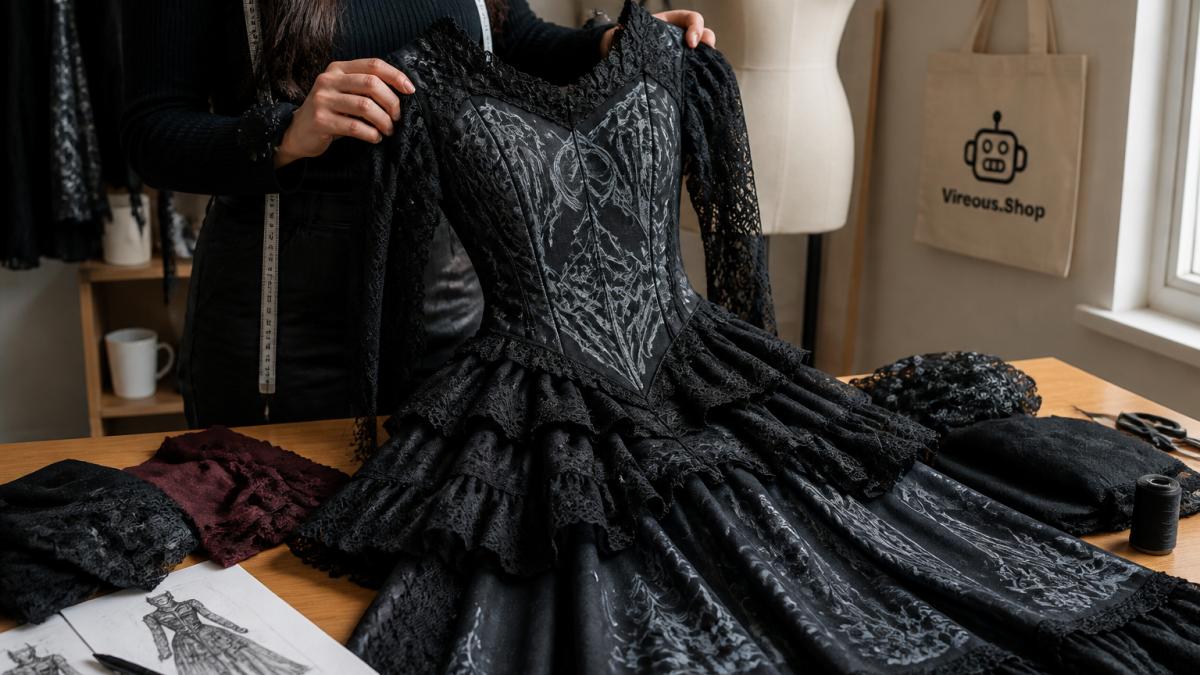
Read the Render as a Construction Document
Before you send anything to production, read your chosen render the way a patternmaker would. Ask four questions of every design:
- Can this silhouette be built from the fabrics shown? A structured velvet corset bodice with sharp boning channels is buildable; a bodice that appears to float without seams, darts, or closures is not. Look for seam lines, darts, princess seams, and closure placements, if they are missing, add them to your prompt or plan to add them at the pattern stage.
- Where does the garment open and close? Every wearable garment has a closure. A floor-length gown with no visible zipper, lacing, or button placket is a render, not a garment. Decide the closure before patternmaking and note it on your tech pack.
- Does the fabric behavior match the silhouette? Chiffon flows; velvet holds structure; lace is sheer and needs a lining; neoprene holds shape but does not drape. If your render shows a flowing skirt but you plan to produce in a stiff fabric, the finished piece will not match the concept.
- Are the details producible at your scale? Tiny filigree, micro-embroidery, and fine lace patterns may not survive screen printing, embroidery, or small-batch cut-and-sew. If a detail is smaller than roughly a quarter inch, it will blur or disappear, simplify or scale up before production.
Validate Fit and Grading
AI renders show a garment on a model, but they do not grade. A design that looks correct on one body type may not translate across a size run.
- Identify the base block. Most cut-and-sew production starts from a base pattern block (fitted bodice, A-line skirt, straight-leg pant). Match your render to the closest block before grading; if no standard block supports the silhouette, you need a custom pattern, which raises cost and lead time.
- Check the size range. Decide up front whether the design will be a single size or a graded run. Grading a corset-boned bodice is not the same as grading a loose tee, boning channels, lacing, and cup shaping all need size-specific adjustment.
- Plan a fit sample. Order a sample in the middle of your size range, not the smallest. A fit that works on a small sample often fails at the top and bottom of the range.
Translate Surface Treatment into a Production Method
Gothic fashion leans heavily on surface treatment, lace overlay, embroidery, hardware, distressing, appliqué. Each maps to a different production method with different constraints:
- All-over print works for graphic motifs, repeating lace-look patterns, and colorways, but produces no actual texture. If your render shows raised embroidery, an all-over print will read flat.
- Embroidery produces real texture but requires digitizing, has a minimum stitch density, and adds cost per unit. Fine filigree must be simplified to stitch cleanly.
- Appliqué and lace overlay produce the layered look gothic fashion depends on, but require additional pattern pieces and assembly steps.
Decide the production method for each surface element before you finalize the design. A render that mixes print, embroidery, and hardware may need to be split into separate steps or simplified to one method for a small run.

Build a Tech Pack, Not Just a File
A print-ready file is not a production document. A tech pack is. At minimum, it should include flat sketches (front and back) derived from the render, measurements and grade rules, fabric and trim specifications (composition, weight, stretch), colorway with reference values, construction notes (seams, closures, lining, interfacing), placement diagrams for any print, embroidery, or hardware, and label and care instructions.
Test and Quality-Assurance the Sample
Order a sample before you commit to bulk production, and evaluate it against the render, not your memory of it. Does the silhouette match the concept, or did production simplify it? Are the colors accurate? Is the surface treatment the method you specified (print vs. embroidery vs. appliqué)?
Addressing Commercial Rights and Originality
This is the question creators ask most: Can you actually sell designs made with AI? The short answer is yes, with important caveats.
Tools like DALL-E 3, which powers Vireous.Shop's design generation, grant you commercial rights to images you create.
Originality still matters. If your prompt is "black gothic dress," you might get something generic; if it's specific and detailed, you get something unique.
Common Mistakes to Avoid
Most creators make the same errors when they first start using AI fashion design tools.
Mistake 2: Writing vague prompts. "Make a gothic dress" produces generic results.
Mistake 4: Skipping the sample order. This is where most creators lose money.
AI tools for custom gothic fashion design work best when you treat them as collaborators, not magic buttons.
Ready to turn your gothic fashion concepts into wearable pieces? Start with the Create Your Own Design All-Over Print Long Sleeve Midi Dress at $46.00, or explore our full collection of customizable garments.
Frequently Asked Questions
How do I write an effective AI fashion design prompt for gothic styles?
Start with core gothic elements: silhouette (e.g., 'flowing maxi dress'), color palette (black, deep purple, crimson), and specific details (lace, chains, Victorian collars, occult symbols). Example: 'Gothic maxi dress with Victorian corset bodice, intricate lace sleeves, and subtle pentagram embroidery.' Be specific about fabric texture, pattern placement, and mood. Test variations by adjusting one element at a time to see how changes affect the design.
Can AI fashion design tools actually create designs ready for production?
AI tools generate strong visual concepts, but production-ready files require refinement. The generated image serves as your design inspiration and reference. You'll need to adjust resolution, check color accuracy, ensure pattern placement works across garment seams, and verify no design elements get cut off. Vireous.Shop's customization tools let you refine these AI concepts directly before ordering, combining the AI-generated inspiration with production-ready adjustments.
What are the main limitations of AI-generated gothic fashion designs?
AI can struggle with complex seam placement, anatomical accuracy on fitted garments, and maintaining design consistency across multiple pattern pieces. Gothic designs with intricate details sometimes generate unclear or distorted elements. The technology excels at generating inspiration and variations quickly, but human oversight ensures the final design works functionally as clothing. Use AI for concept exploration and rapid iteration, then apply your design expertise to create something truly wearable.
How can I turn an AI fashion concept into an actual custom garment?
Use your AI-generated design as a reference image. Upload it to Vireous.Shop's design tool, where you can customize placement, adjust colors, add text, and refine details using the built-in graphics library. Select your garment type (dress, leggings, crop top, etc.), choose sizing, and place your order. Same-day or next-day dispatch means your AI concept becomes a physical garment quickly. The platform handles all production steps, so you focus on design refinement.