

Table of Contents
- Why Custom AI Art Looks Different
- Training Data Bias and Visual Homogenization
- The Technical Culprits: Over-Smoothing, Artifacts, and Latent Space Limits
- LoRA Training for Unique AI Styles
- AI Art Prompt Engineering Tips to Break the Mold
- How to Avoid Generic AI Art Aesthetics
- Why the 'AI Look' Persists and How to Break Free
- Conclusion
Last Updated: August 11, 2026
Why Custom AI Art Looks Different
If you've generated AI art before, you've probably noticed something: the results have a distinctive visual quality that sets them apart from human-created work. That polished, almost hyperreal aesthetic isn't accidental. It's the inevitable output of how diffusion models process information, the data they were trained on, and the mathematical constraints built into their architecture.

Understanding why custom AI art looks different is essential if you want to create work that breaks free from the generic "AI look." The issue isn't that AI can't produce beautiful imagery, it can. The problem is that most AI systems tend toward the same visual preferences, creating a homogenized aesthetic that feels recognizable across thousands of images.
At Vireous.Shop, we've seen creators struggle with this exact challenge. They imagine a specific style in their head, input a detailed prompt, and receive something that technically matches the description but feels unmistakably AI-generated. This guide breaks down the technical reasons why that happens and, more importantly, how to overcome it.
Training Data Bias and Visual Homogenization
The foundation of any AI image generator is its training data. Diffusion models learn by studying millions of images and learning the statistical patterns within them. But those datasets aren't neutral collections, they reflect the images that exist online, which means they're heavily weighted toward certain aesthetics, subjects, and styles.
Most publicly available training data skews toward high-contrast, saturated colors and hyper-realistic renderings. When a model learns from predominantly professional photography and polished digital art, it internalizes those preferences as "good" imagery. The result is that when you ask for almost anything, the model gravitates toward that established visual language.
This creates visual homogenization across AI-generated work. A portrait of a medieval knight, a futuristic city, or an abstract landscape all carry similar visual signatures: the same color saturation, similar lighting patterns, comparable levels of detail in certain areas. It's not that the model is lazy, it's that the model has learned one dominant aesthetic and defaults to it.

The deeper issue is pattern recognition versus creative intent. AI models don't understand what you're asking for in the way a human artist does. They're recognizing patterns from training data and reconstructing variations of those patterns. If your prompt describes something that appeared rarely in the training data, the model fills in the gaps with its learned defaults.
The Technical Culprits: Over-Smoothing, Artifacts, and Latent Space Limits
Three technical factors explain most of the visual oddities in AI-generated imagery: over-smoothing, common visual artifacts, and the inherent limitations of latent space representation.
Over-smoothing and texture loss
Diffusion models work by gradually adding noise to an image and then learning to remove it. This denoising process is mathematically elegant but comes with a cost: loss of fine texture detail. The model prioritizes broad shapes and color distributions over intricate surface qualities.
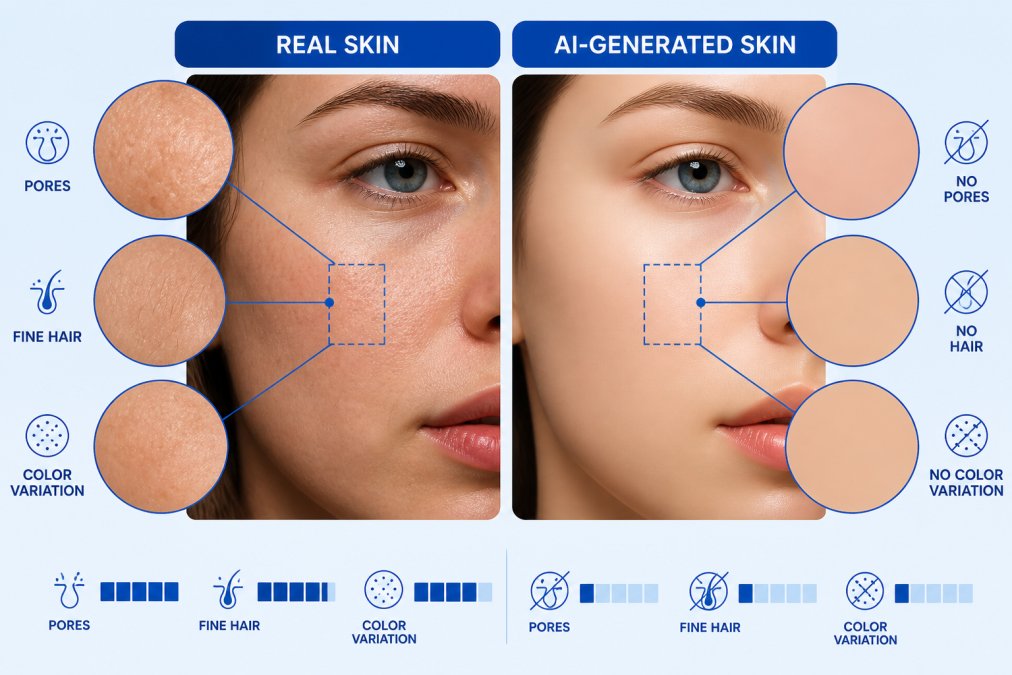
This is why AI art often looks slightly plastic or porcelain-like. Real skin has pores, fine hairs, and micro-variations in tone. Fabric has weave patterns and subtle wrinkles. Wood has grain and weathering. AI models struggle to preserve these micro-level details because the denoising process smooths them out in favor of larger compositional elements.
The effect is particularly noticeable in close-up portraits and detailed textures. A hand generated by AI will have the correct number of fingers and generally accurate proportions, but the skin will lack the complexity of real human skin. This smoothness is one of the most immediate visual tells that something is AI-generated.
Common visual artifacts and uncanny valley effects
Beyond over-smoothing, AI systems produce specific recurring artifacts. Hands are notoriously difficult, fingers often have the wrong number of joints or bend at impossible angles. Eyes frequently look slightly wrong, with asymmetrical pupils or unnatural reflections. Lighting can be physically impossible, with shadows falling in contradictory directions.
These aren't random errors. They occur because hands, eyes, and complex lighting conditions appeared in the training data in ways that were ambiguous or contradictory. When the model encounters a prompt requiring these elements, it synthesizes from conflicting learned patterns, producing something that reads as almost-right but fundamentally off.
This creates an uncanny valley effect. The image is realistic enough to register as a photograph but strange enough to trigger discomfort. Your brain recognizes that something is wrong even if you can't immediately identify what. This is one of the strongest signals that an image is AI-generated rather than human-made.
Latent space limitations and compositional errors
Diffusion models don't work directly with pixel data. Instead, they operate in a compressed mathematical space called latent space. This compression allows the model to work efficiently, but it also introduces constraints. Complex spatial relationships, precise geometric arrangements, and intricate compositional structures sometimes break down.
This is why AI art sometimes produces impossible architecture, objects that overlap in physically contradictory ways, or scenes where perspective doesn't quite work. The model understands general spatial relationships but struggles with precise geometric consistency. A building might have walls that don't align properly, or a room might have dimensions that don't make sense when you examine it closely.
Tangencies, where two objects meet at a precise angle or line, are particularly problematic. AI models often blur or distort these boundaries rather than rendering them cleanly. This creates a soft, almost melted quality where objects meet, which is another visual signature of AI work.
LoRA Training for Unique AI Styles
One of the most effective ways to break the generic AI look is LoRA training. LoRA stands for Low-Rank Adaptation, and it's a technique that allows you to fine-tune a base model with a smaller dataset to create a distinctive visual style.
Instead of training a full model from scratch (which requires enormous computational resources), LoRA works by training a small set of additional parameters that modify how the base model operates. This means you can take a general-purpose diffusion model and adapt it to your specific aesthetic preferences or artistic style.
The practical advantage is significant. If you have a collection of images that represent your desired visual style, whether that's a specific color palette, compositional approach, or artistic technique, you can use LoRA to train the model to prefer those characteristics. Subsequent generations will carry those stylistic signatures, making your AI art look less generic and more personally distinctive.
LoRA training for unique AI styles works because it essentially teaches the model your visual preferences. Instead of defaulting to the most common patterns in its training data, it learns to emphasize the patterns you care about. The result is imagery that feels more intentional and less like generic AI output.
The limitation is that LoRA training requires some technical knowledge and a decent collection of reference images. But for creators serious about developing a distinctive AI aesthetic, it's one of the most direct paths to breaking free from the homogenized look.
AI Art Prompt Engineering Tips to Break the Mold
How you write your prompt dramatically influences the output. Most people write vague prompts and accept whatever comes back. But strategic prompt engineering can guide the model toward less generic results.
The first principle is specificity. Instead of "a portrait of a woman," try "a portrait of a woman with asymmetrical lighting, shot on Kodachrome film, with visible film grain and warm color cast." The more specific your description, the harder it is for the model to default to its learned aesthetic preferences.
The second principle is negative prompting. Most modern AI tools let you specify what you don't want in the image. Use this to explicitly exclude the generic AI signatures: "no plastic skin texture," "no impossible hands," "no uniform lighting," "no oversaturated colors." This forces the model to explore alternatives to its defaults.
The third principle is reference specificity. Instead of describing an aesthetic, reference specific artists, photographers, or films. "In the style of Diane Arbus" or "shot like a 1970s Kodak Portra photograph" gives the model concrete visual patterns to draw from. This works because these references exist in the training data in distinct enough ways that the model can differentiate them.
The fourth principle is constraint-based prompting. Tell the model what medium or technique to use: "oil painting with visible brushstrokes," "watercolor with paper texture," "pencil sketch with hatching." These technical constraints push the model away from its default photorealistic aesthetic.
AI art prompt engineering tips should also include experimentation with weighting. If your platform supports it, you can assign different importance levels to different parts of your prompt. Emphasize the elements that matter most and de-emphasize generic descriptors.
How to Avoid Generic AI Art Aesthetics
Breaking the AI look requires a combination of technical understanding and creative strategy. The most effective approach is to actively work against the model's defaults rather than accepting its initial output.
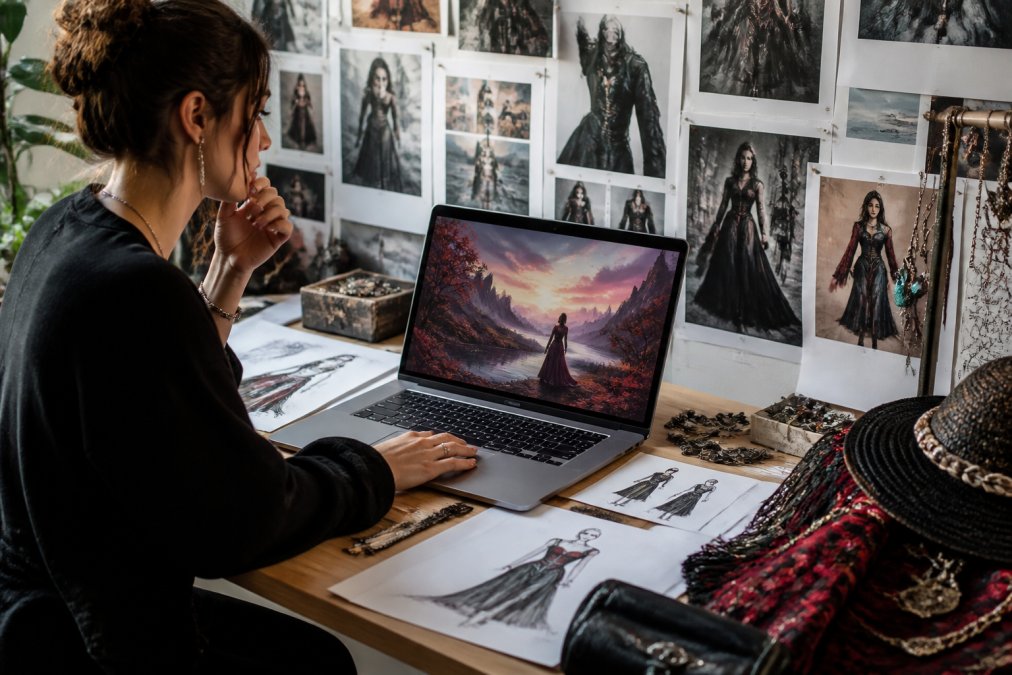
Start by identifying what makes something look generically AI. Spend time looking at AI-generated images and noting the common characteristics: the color saturation, the texture smoothness, the lighting patterns, the compositional choices. Once you can recognize these patterns, you can actively prompt against them.
The second strategy is to use reference images extensively. Don't just describe what you want, show the model examples. Many platforms now support image-to-image generation, where you provide reference images and the model uses them to guide its output. This is far more effective than text description alone because it grounds the generation in specific visual information.
The third strategy is iterative refinement. Your first generation is rarely perfect. Use the output to inform your next prompt. If the model produced something close but with specific problems, adjust your prompt to address those issues. This iterative approach works because you're gradually training your own understanding of how the model responds to different inputs.
The fourth strategy is to embrace imperfection strategically. Some of the most interesting AI art comes from accepting or amplifying the artifacts rather than trying to eliminate them. If the model produces slightly wrong hands or impossible geometry, you can lean into that as an intentional aesthetic choice rather than treating it as an error.
For creators using Vireous.Shop's platform, the OpenAI integration and DALL-E 3 API access give you direct control over prompt refinement and multiple generation attempts. This makes iterative improvement practical, you can test variations quickly and identify what works for your specific creative vision.
Why the 'AI Look' Persists and How to Break Free
The AI aesthetic persists because it's the statistical center of gravity for most training data. Models naturally converge toward the most common patterns because that's what maximizes their accuracy across the broadest range of inputs. Fighting this requires conscious effort.
The second reason is that most users don't push back against it. Default settings, generic prompts, and acceptance of initial outputs reinforce the homogenized aesthetic. Each time someone generates an image without prompt engineering or refinement, they're essentially voting for the generic look.
Breaking free requires understanding that the "AI look" isn't inevitable, it's a choice made by the model based on its training and your input. By being intentional about your prompts, your references, and your refinement process, you can guide the model toward genuinely distinctive output.
The most important insight is that custom AI art looks different from generic AI art not because of the tool, but because of how you use it. Two people using the same model can produce radically different results based on their prompt engineering, their reference selection, and their willingness to iterate.
The gap between generic AI output and distinctive custom work comes down to intention. Understanding the technical reasons why AI defaults to a particular aesthetic, training data bias, over-smoothing, latent space constraints, is the first step. Applying that understanding through careful prompt engineering, reference selection, and iterative refinement is how you create work that breaks the mold.
If you're serious about creating distinctive AI-generated art, the tools and platform matter less than your approach. Vireous.Shop's integration with OpenAI's technology and DALL-E 3 API gives you the technical foundation to experiment with prompt variations, generate multiple iterations, and refine your aesthetic. Combined with the strategic techniques outlined here, you can move beyond generic AI output and create work that feels genuinely personal.
| Technique | Purpose | Difficulty |
|---|---|---|
| Specific prompt language | Guide model away from defaults | Low |
| Negative prompting | Exclude unwanted characteristics | Low |
| Reference-based prompting | Anchor generation to specific aesthetics | Medium |
| LoRA training | Fine-tune model to your style | High |
| Iterative refinement | Improve output through multiple generations | Medium |
| Image-to-image guidance | Use references to direct generation | Medium |
Frequently Asked Questions
Why does all AI art look the same?
AI models train on massive datasets of images that already share common aesthetic patterns. Diffusion models learn to recognize and reproduce these dominant visual styles because they appear most frequently in the training data. The denoising process also tends to favor high-contrast, saturated colors and hyper-realistic rendering, creating a homogenized look. Most users rely on similar prompts and default settings, which amplifies this effect. Breaking the mold requires custom training, specific prompt engineering, or tools like LoRA that let you fine-tune the model toward your unique vision.
What role does prompt engineering play in making AI art look unique?
Prompt weighting and specific language choices directly influence which features the neural network prioritizes during image synthesis. Instead of generic terms like 'beautiful portrait,' detailed prompts referencing specific art movements, textures, lighting conditions, and compositional styles guide the model toward less common outputs. Advanced prompt engineering also involves negative prompts that exclude aesthetic clichés. The difference is measurable: artists who spend time refining prompts report significantly fewer algorithmic artifacts and more distinctive results than those using basic descriptions.
Can custom-trained models actually produce visually different AI art?
Yes. LoRA training and fine-tuning let you adapt model weights toward your specific style preferences, subject matter, or visual goals. Custom training reduces the model's reliance on its default aesthetic bias by exposing it to a narrower, curated dataset. This shifts the feature extraction process away from the mainstream visual tropes the base model learned. The result is AI art that diverges meaningfully from the generic 'AI look' and reflects your creative intent rather than the model's default preferences.
Why do AI images often struggle with hands, eyes, and lighting?
These details require pixel-level processing precision that diffusion models struggle with due to latent space limitations. Hands and eyes involve complex tangencies and fine anatomical relationships that the model's compressed representation cannot fully capture. Lighting and shadows require understanding of three-dimensional space and physics, which the model infers from 2D pattern recognition rather than true spatial reasoning. These rendering artifacts are not bugs but inherent to how neural network architecture processes visual information. Prompt engineering that explicitly addresses these areas and reference images can help mitigate these issues.
This article was written using GrandRanker